FAQ
If you cannot find the answer to your question below, contact us at kansliet@uppsalamakerspace.se and we will answer it, or reach out to our members through our Facebook group or our Slack chat.
- I have paid, when does something happen?
- I have not received any email, what do I do now?
- What are the opening hours?
- Can I drop by and have a look without being a member?
- Can I be in the space without being a member?
- I am a member but not a lab member — when can I be in the space?
- I am a member but not a lab member — can I use the materials in the space?
- Can I park outside the space?
- The lock will not let me in. What do I do?
- How does storing projects between visits work?
- My project is much bigger than a lab box — can I still store it at the space?
- I would really like to use tool X — may I?
- I would like to donate things to the association — how do I go about it?
- Can I use the materials in the space?
- How much material may I take?
- What do I do if I have used, or am going to use, a lot of material?
- What do I do if a material runs out or is missing?
- Can I suggest materials for the space?
- As a non-member, can I ask the association to print/turn/etc something for me for payment?
- May I make things at the Makerspace in order to sell them?
- What should I do if I see someone shoplifting or stealing in the space?
- How do I claim an expense I have paid for the association so that I get the money back?
- I have paid, when does something happen?
Incoming payments are handled manually by volunteers in their spare time, so how long it takes varies. We usually check about three times a week. That means you should generally get an information email to the address you gave within three days, but in some periods it can take a week or so.
- I have not received any email, what do I do now?
If the reply from kansliet@uppsalamakerspace.se takes more than a week, we recommend checking your spam folder first in case it ended up there. If you cannot find the email, get in touch with the address above and ask whether something went wrong. You can also drop into our Slack chat and ask — there is nearly always someone responsible online who can pick up your question.
- What are the opening hours?
For lab members the space is open around the clock, every day of the week. You get access to our doors through an app (DanaLock), which needs a smartphone running iOS or Android.
For regular members the space is open on the open evenings listed in the calendar on this site, which you can also subscribe to as a Google Calendar.
- Can I drop by and have a look without being a member?
You are welcome to visit us on the open evenings marked in the calendar. We aim to have one open evening a week. On those evenings there is always a host on site who shows you around and answers questions. If you like what you see, you can become a member on the spot.
- Can I be in the space without being a member?
There are three situations in which you may be in the space without being a member:
- You are taking part in an open workshop
- You drop by on an open evening when a host is on site
- You come along with an existing lab member who takes responsibility for you
Note that options 2 and 3 are both there to give you a chance to see the space, ask questions and try things out before you decide whether to become a member. So they are not meant to happen regularly.
- I am a member but not a lab member — when can I be in the space?
As a regular member you can be in the space when it is announced as open and a host is on site. That covers a few different occasions, the most common being:
- Open evenings (we aim for one a week)
- Workshops and themed sessions
- Fix-up days for the space
- Members’ meetings
Note that it is not okay for a regular member to rely regularly on being let in by lab members outside those announced occasions. If that is what you need, become a lab member instead.
- I am a member but not a lab member — can I use the materials in the space?
In general you need to be a lab member to take materials from the space; otherwise you are expected to bring your own. There are a few exceptions:
- At workshops you may use the materials that are included.
- On open evenings you may use the materials kept in the rooms next to the workstations — filament for the 3D printer, electronic components at the soldering stations, offcuts of wood in the workshop, fabric at the sewing machines, and so on.
Note: you may not take materials from the storage room.
- Can I park outside the space?
Yes, there is paid parking right next to the space, and several alternatives nearby. See our space for more information.
- The lock will not let me in. What do I do?
To open our doors with DanaLock you must, after registering, have been granted access by one of the people responsible for the locks, following the instructions in the welcome email. If you have been told your access is in place, the app then needs internet access and access to GPS in order to unlock — so turn those on if they are off. Then try force-quitting and restarting the app, and after that restarting the phone. The DanaLock app also has a “Refresh keys” function that solves many entry problems.
- How does storing projects between visits work?
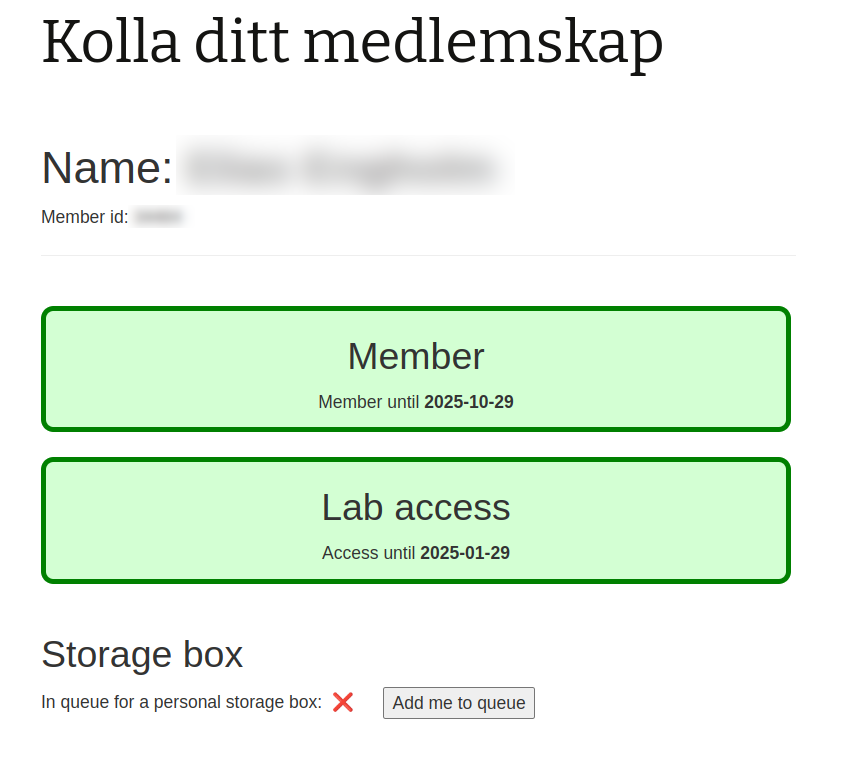
Everyone who becomes a lab member can join a queue for a place for their own storage box on the shelves just inside the metal workshop. Your place in the queue is based on your total time as a member. To be offered a shelf place when one becomes free you have to activate your place in the queue, which you do by logging in to the member page and ticking “add me to queue” as in the picture:
You can turn down an offer of a shelf place temporarily and still keep your place in the queue.
We recommend a plastic box of the SmartStore Classic 45 model (60×40×31 cm), sold in many places, for instance at Clas Ohlson, Bauhaus and Rusta. A few such boxes may be in stock for sale at the space.
Every box and item on the shelf must be clearly labelled with your first and last name. If you intend to take a break and not be an active lab member for more than a month, take your lab box home.
- My project is much bigger than a lab box — can I still store it at the space?
Projects that do not fit in your lab box may be put in our storage room temporarily. Everything must be clearly labelled with your name, mobile number, the date it was put there and the date it will be removed. We recommend not keeping large projects in the storage room for more than a week at a time. Things that take up a lot of room are in the way of others who want to use the space, so it matters that they do not simply stay there. If a project has stalled, take it home.
Projects that are fragile or hard to move may stand in our other rooms in a way that keeps them out of the way, but for a few days at most. Since there is a real risk that such things get in the way of other members, it is all the more important that they are clearly labelled with name and mobile number.
Projects that are unlabelled, in the way, or left for a long time become the property of the association. They may then be turned into material for new member projects, or thrown away.
- I would really like to use tool X — may I?
All members of the association may use every tool in our space, unless there is information on the tool itself saying otherwise. You are responsible for using it correctly and safely. The easiest route is to contact another member who knows the tool and get a short introduction.
We regularly — at least twice a year — run introductions to our most-used tools, such as the 3D printer, the soldering stations and the big machines in the workshop like the band saw. If you would like a walkthrough of a particular tool, contact the person responsible for activities at christoffer@ramis.se to register your interest, and we may put them on a little more often.
- I would like to donate things to the association — how do I go about it?
We are very happy to receive tools, equipment and consumables for the space, but before you leave anything there we would like you to get in touch at kansliet@uppsalamakerspace.se, or write to the members directly in a relevant Slack channel such as “#lokalen”, and double-check that we really are interested. If we are, you are welcome to visit us on one of our open evenings (the schedule is on this site), or agree another time to deliver the things. What we do not appreciate is things being dumped in the space unannounced that nobody, or very few, can use. Those will be thrown away.
Here are some examples of what we are glad to receive (but do contact us to be sure):
- Tools and materials for textile work, such as sewing machines, needles and thread
- Tools and materials for working with paper, such as scissors, pens and paint
- Arduinos and Raspberry Pis (they do not have to be the top models)
- USB sticks
- SD cards
- USB chargers and cables
- Old laptops less than 10 years old
- Electronic components
- Label printers
- Can I use the materials in the space?
As a lab member you may use the materials in the space within reason. In practice that means you may use planks, plywood, nails and screws in the workshop; in the studio you can take parts from the component cabinet, such as diodes and resistors, and of course use solder and print on the 3D printer; in the textile room you may take fabric from the rolls and sew on the machines. These are only examples — there are many more kinds of material in the space.
- How much material may I take?
We have no hard limits today; instead we hope members can judge for themselves what reasonable use looks like. To give some sense of it, “a lot” of material might be:
- Several full-length planks,
- Prints amounting to more than half a roll of filament,
- More than 5 metres of fabric.
- What do I do if I have used, or am going to use, a lot of material?
If you have used a lot of material you should replace roughly what you used as soon as you can. Note: for 3D printer filament, please check with the association first that it is a suitable one, so that we keep track of which plastics we use and avoid trouble with the printers.
If you know in advance that you are going to use a lot of material, it is of course best to buy the equivalent beforehand. If it will take more than a day or two, and especially if you have used up nearly all of one kind of material, say so in Slack to warn others and to let them know roughly when you will replace it.
If you are not able to replace what you used — because you have no car, say — then say so in advance so that someone else can plan the purchase and you can reimburse them.
- What do I do if a material runs out or is missing?
Tell the person responsible for that room. If you do not know who that is, say so in Slack and the person responsible will make sure it gets bought.
- Can I suggest materials for the space?
Of course, and if it is something many people want and it is not too expensive, it will very likely be bought. Do note that it can take a while. If you are impatient, talk to someone responsible and see whether you can help by buying it for the space yourself, in an agreed quantity and quality. It goes faster when we help each other.
If the material is too expensive, or not wanted by enough people, you may need to buy it with your own money.
- As a non-member, can I ask the association to print/turn/etc something for me for payment?
No, you cannot — become a member instead. It does not cost much and it is good fun!
- May I make things at the Makerspace in order to sell them?
No, you may not. The purpose of the Makerspace is to make the members’ own hobby activities possible. Members can create prototypes for various purposes, but not run outright production aimed at selling.
Among the reasons commercial manufacturing is not allowed:
- Other people’s voluntary efforts should not be used for commercial ends.
- All production consumes materials and wears tools, which then competes with the hobby activities.
- The Makerspace is not a workplace; that would require different insurance and brings legal requirements about liability.
One exception is if the association jointly decides to manufacture for sale — for instance to raise money for the association.
- What should I do if I see someone shoplifting or stealing in the space?
Minors
Is it a minor? Say something straight away. Speak kindly, but do not make concessions. Explain that:
- Taking something from the kiosk without paying, or taking one of our shared tools home, is stealing.
- Theft makes our shared makerspace worse, because it removes resources we want to spend on making things and on making the place better for our members.
- You are going to contact the person’s parents.
Contact the person’s parents. Ask the board or someone else responsible for help if you cannot do it yourself.
Adults
If you can, say something straight away. Explain that you believe you saw something untoward, and ask the person to return what was taken or to pay for it. If that does not happen, inform the board.
If it feels unsafe or difficult to confront someone directly, tell the board what you observed. The board will look into it and report it to the police if it is judged that a theft has taken place.
- How do I claim an expense so that I get the money back?
Short version
- Register the purchase in the “Gruppkassor” (group funds) document, under the tab for the relevant group fund. If you do not have access to the document, contact someone responsible for the workshop.
- Take a clear photo of the receipt and email it to kansliet@uppsalamakerspace.se. Include which group fund the purchase belongs to and — if this is the first time you are claiming — your bank details (account number and the account holder’s name) for the payment.
Long version, in detail
1. Make a purchase
- Make sure the purchase is agreed within a group. Otherwise you will not be reimbursed!
- Make sure you can afford to be out of pocket for up to a month (unless it is a shop that can invoice, which has to be arranged in advance). If you cannot, team up with someone else in the group who can pay.
- Get a receipt. Note: one receipt per group you are buying for.
2. Report your purchase
- The expense is to be recorded in a document for the group the purchase concerns (at the time of writing that document is called “Gruppkassor”, but it will be split into one document per group). If you do not have access to it, contact someone in the relevant group and tell them A) what you have bought and B) how much it came to. Or ask to be given access to the document.
- If you have a paper receipt: write your name on it and photograph it. Digital receipts do not need printing.
- Send an email to kansliet@uppsalamakerspace.se attaching the digital receipt or a photo of the paper one. State the amount and which group the expense belongs to. If this is your first expense claim, include your account details as well. (Reimbursement is only paid by bank transfer.)
3. Wait for the money
It is paid out as soon as our treasurer gets to your claim. Be patient!